Credits : This survival guide on Linux was created by C. Tranchant.
First steps on Linux#
Commands for moving around the file system and manipulating files/folders
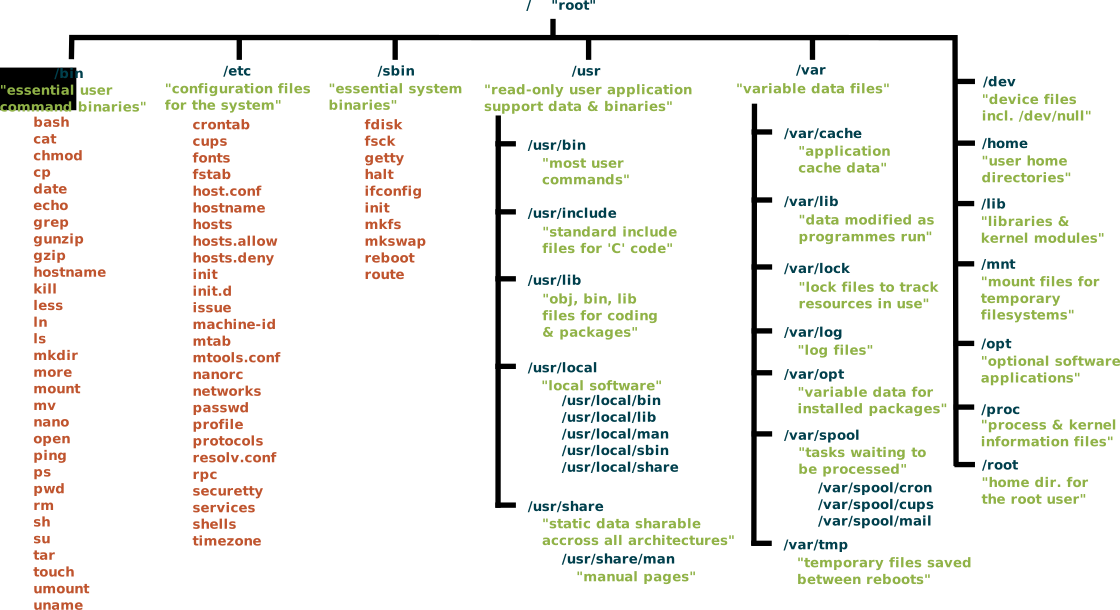
Linux command syntax#
command [ -options] [ arguments ]
Your first command pwd#
pwd print the name of the current directory (the full path)
pwd
answer
/home/toto/

2nd command ls#
Without argument : list all the files in the current directory (by default)
ls
2nd command + option ls -l#
ls -l : list files with more information about each file (long)
ls -l
2nd command + argument#
with argument <=> directory path
ls PUT_HERE_DIRECTORY_NAME
Question
 list the content of the directory REF
answer
ls /home/joyvan/SV_DATA/REF
obtaining help#
How to get help about one command
With the option --help ou -h
With the command man
A summary of survival commands#
| command | action |
|---|---|
| pwd | Display the full path of the current directory |
| ls | List all files/directories |
| ls -l | Display all files (Long listing) |
The file tree#
The file tree - file system#
Directory structure starts at the root directory called “/” (slash)

Question
list the content of the root directory
The file tree - Main directories#
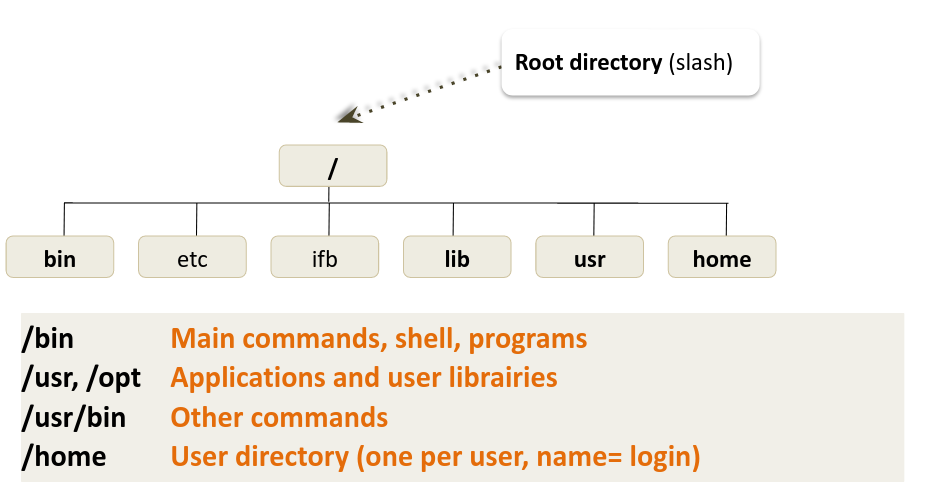
Path of a file#
Path = location to a file/directory in the file system
On linux filetree, you can use absolute or relative path
Question
 What is the difference between the absolute and relative path ?
In brief : absolute vs relative path#
Path = location to a file/directory in the file system
| ABSOLUTE | RELATIVE |
|---|---|
| Complete path of a file starting from the root directory / | Path related to the present working directory (where the user is working) |
| starts always with / | Never starts with / |
| always good wherever user is working | Depends on where the user is working |
Absolute Path#
Always start with / (root directory)
Always works wherever user is working on the server or vm
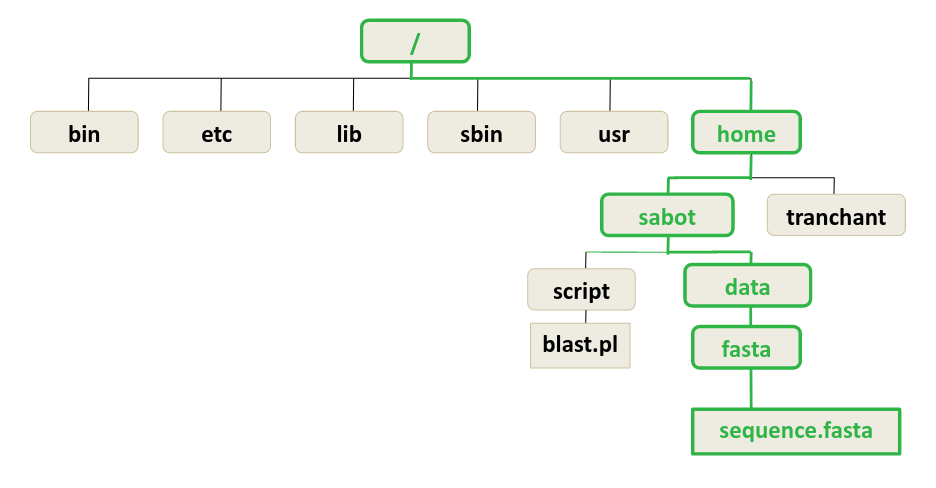
Question
What is the absolute path of the file sequence.fasta ?
answer
ls /home/sabot/data/fasta/sequence.fasta
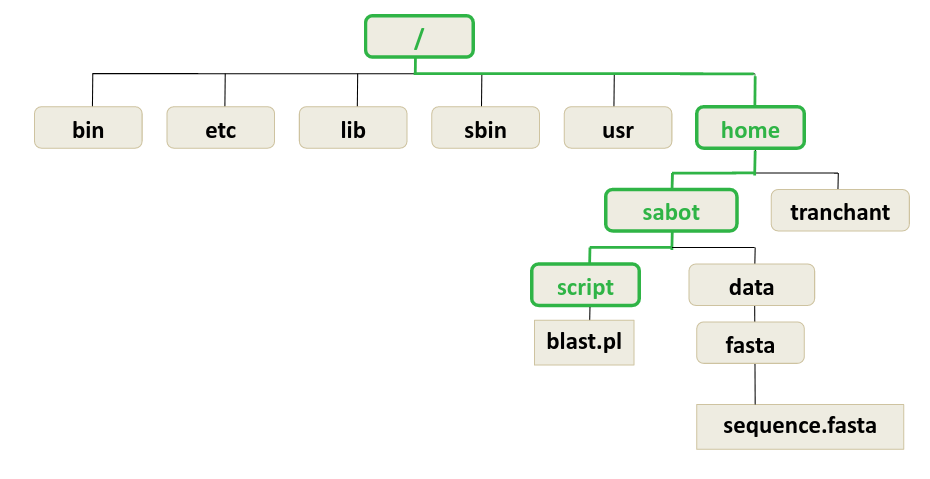
Question
What is the absolute path of the directory script ?
answer
ls /home/sabot/script
Relative Path#
Path related to the present working directory
Never starts with /
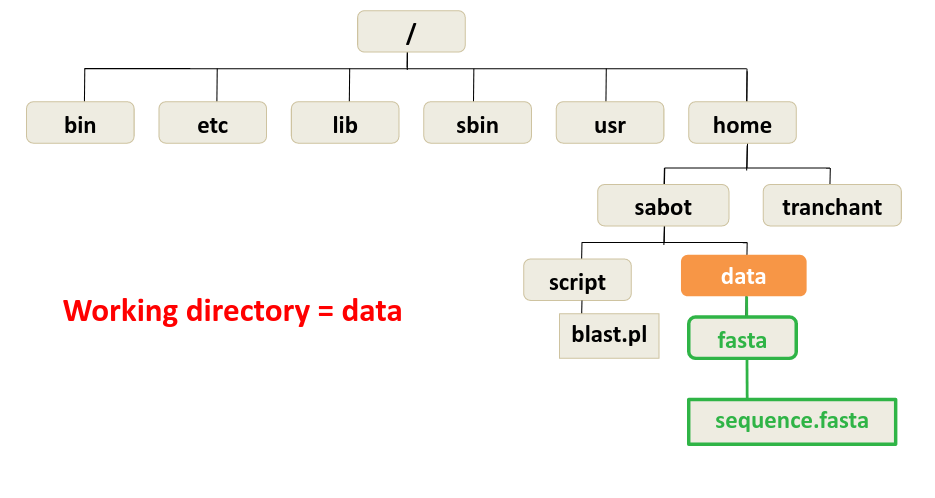
Question
What is the relative path of the file sequence.fasta ?
answer
ls fasta/sequence.fasta
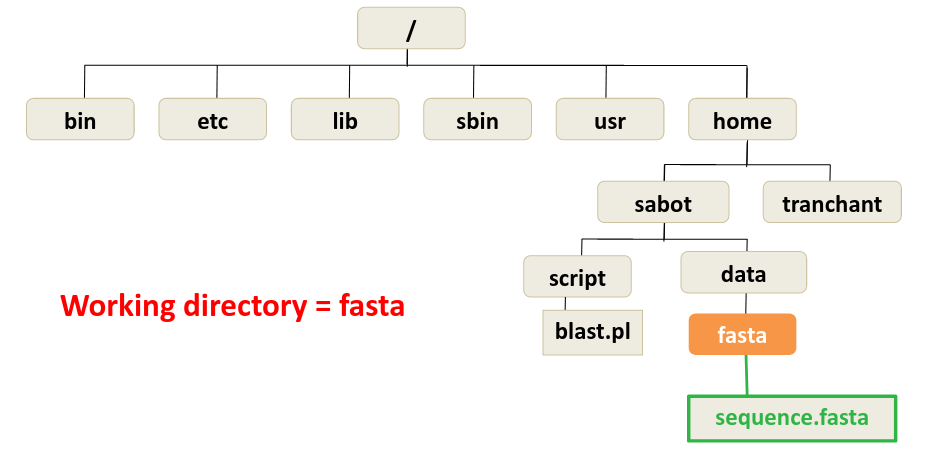
Question
What is the relative path of the directory fasta ?
answer
ls .
Rules for naming file and directory names#
-
Linux is case sensitive
-
Only ROMAN letters, numbers and _ -
-
No space, accent or special symbol
-
No need to use filename extension (.txt), just to improve readability of filenames.
Command cd#
cd as Change Directory
Move from the current directory into a new directory
cd DIRECTORY NAME (could be absolute or relative path)
Question
Move into the REF directory (absolute path)
answer
cd /home/jovyan/SV_DATA/REF
Question
Move into the SV_DATA directory (absolute path)
answer
cd /home/jovyan/SV_DATA
Question
Move into the SHORT_READS directory (relative path)
answer
cd SHORT_READS/
Some Commands#
| command | action |
|---|---|
| pwd | Display the full path of the current directory |
| ls | List all files/directories |
| cd DIR_NAME | Change the working directory |
| rm nom_fichier | Remove a directory |
| cp file1 file2 | Make a copy of file1 and calls it file2 |
| cp FILE_NAME DIR_NAME | Copy the file FILE_NAME in the directory DIR_NAME |
| cp FILE DIR/NEW_FILE | Mix of 2 |
command cat#
cat file_name Displays the content of a file on the screen
Warning
Don’t use it with big files!!
cat sequence.fasta
command wc#
wc -l : Displays the number of lines in a file
wc -l sequence.fasta
command head#
head nom_fichier : writes the first ten lines of a file to the screen
head sequence.fasta
head -n 20 sequence.fasta
command tail#
tail nom_fichier : writes the last ten lines of a file to the screen
tail sequence.fasta